JS Reference
- Array
- Debugger
- GolbalThis String
Service Workers
Web Components
ESModule Tips
NodeJS Tips
Javascript Tutorial
Keyword globalThis for undeclared var
Undeclared var variable inside a function
globalThis keyword - Javascript
If a javascript variable is used inside a function without prior declaration, still the variable will be defined and allocated as a var with global scope.
Sample Scenario - var usage
- Use var in a function/non-global scope without declaration
-
In the sample program
- oopsglobal variable is used without declaration
- It is declared in the global scope by the nodeJS and browser interpreter during the run time.
- Name the javascript file as .cjs as CommonJS
CommonJS in NodeJS backend
Sample Code - NodeJS CommonJS javascript code
script.cjs
let letName = `John Doe`;
var varAge = 12;

function testoops() {
    // no declaration var means global var
    oopsglobal = 10;
}

function testlocal() {
    let local = oopsglobal;
    console.log("The Oopsglobal inside function: ", local);             // Result 10 - accessed within function undeclared
    return local;
}

testoops();
value = testlocal();

console.log("The Oops global using returned value is: ", value);        //Result 10 - return from local function
console.log("The Oops global using Global value is: ", oopsglobal);     //Result: 10 - Global usage oops global

console.log("This Value: ", this);                                      //Same as Global, Output: {} for nodejs
console.log("Global Value: ", global);                                  //Same as Global
console.log("GlobalThis Value: ", globalThis);                          //Same as Global
// console.log(window)                                                  //Same as Global,in browser (non NodeJS)

console.log("letName: ",globalThis.letName);                            //Node:undefined
console.log("varAge: ", globalThis.varAge);                             //Node:undefined Browser: Defined //Browser Output: 12
console.log("oopglobal: ", globalThis.oopsglobal);                      //Node: 10, Browser: 10 - //defined both
Sample execution command- NodeJS CommonJS javascript code
$> node script.cjsCopy
Sample Output - NodeJS CommonJS javascript code
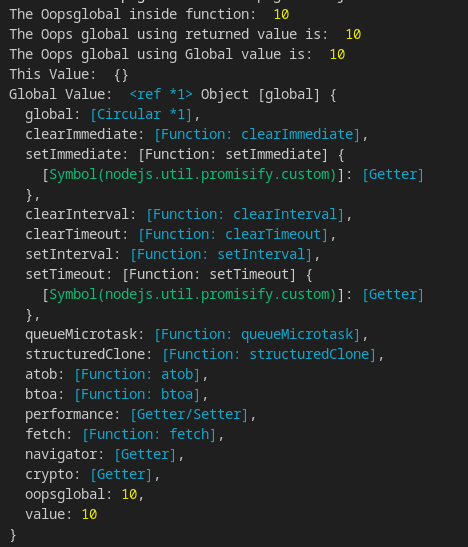
Sample program output - part1
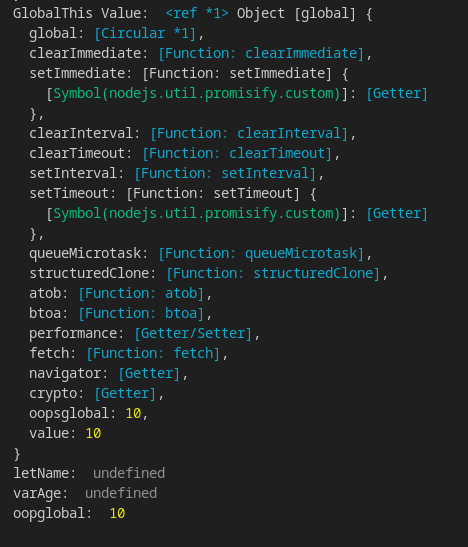
Sample program output - part2
Javascript in the browser
Sample Scenario
-
HTML reference, javascript code inclusion
- not to include the script with type = "module"
- Javascript as "module" has default use strict;
- This will make the program run with Strict Mode
- Variables without declaration are not allowed in the Strict Mode
Sample Code - In the Browser (Not a module) javascript code
script.js
index.html
let letName = `John Doe`;
var varAge = 12;

function testoops() {
    // no declaration var means global var
    oopsglobal = 10;
}

function testlocal() {
    let local = oopsglobal;
    console.log("The Oopsglobal inside function: ", local);             // Result 10 - accessed within function undeclared
    return local;
}

testoops();
value = testlocal();

console.log("The Oops global using returned value is: ", value);        //Result 10 - return from local function
console.log("The Oops global using Global value is: ", oopsglobal);     //Result: 10 - Global usage oops global

console.log("This Value: ", this);                                      //Same as window, Output: {} for nodejs
//console.log("Global Value: ", global);                                //Browser JS : global not defined
console.log("GlobalThis Value: ", globalThis);                          //Same as window
console.log(window)                                                     //Same as globalThis, in browser (non NodeJS)

console.log("letName: ",globalThis.letName);                            //Node:undefined
console.log("varAge: ", globalThis.varAge);                             //Node:undefined Browser: Defined //Browser Output: 12
console.log("oopglobal: ", globalThis.oopsglobal);                      //Node: 10, Browser: 10 - //defined both
<!DOCTYPE html>
<html lang="en">
<head>
<meta charset="UTF-8">
<meta name="viewport" content="width=device-width, initial-scale=1.0">
<title>Document</title>
</head>
<body>
<script src="script.js"></script>
</body>
</html>Sample Output - NodeJS CommonJS javascript code
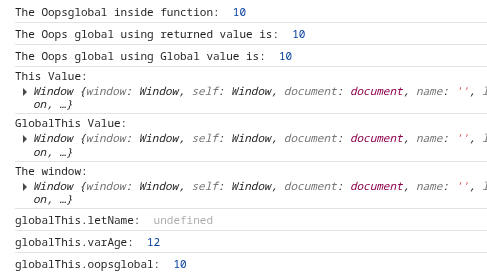
Sample program output - Global This in the browser